
AutoMosaic (R18)
Batch auto-mosaic tool designed for sensitive images. GPU-accelerated for fast processing across multiple images.
AutoMosaic (R18)
画像内のセンシティブ部位を自動検出し、複数画像に連続でモザイク処理を施すツールです。GPU対応により高速処理を実現。
Overview 概要
Automatically detects specific regions in images and batch-processes multiple images. Offers the highest detection accuracy in its price range (free to a few thousand yen). Operates offline by default for privacy protection. Try the trial version!
画像内の特定部位を自動検出し、複数の画像に連続で画像処理を施していけるツールです。この価格帯(無料〜数千円)の類似ソフトウェアの中では検出精度は最も高いかと思います。基本はネットワークを介さず動作するため、プライバシーも安心です。ぜひ体験版でお試しください。
- Offline: no uploads, no cloud processing
- Batch: process many images at once
- Presets: pick what to detect and the output style
- Supported formats: JPG / PNG / BMP / GIF / WEBP
- Processing speed: 1-3 sec (GPU) / 5-8 sec (CPU)
- オフライン動作:アップロード不要、クラウド処理なし
- バッチ処理:複数画像をまとめて処理
- プリセット:検出対象と出力スタイルを選ぶだけ
- 対応画像形式:JPG / PNG / BMP / GIF / WEBP
- 処理速度:1-3秒(GPU) / 5-8秒(CPU)
Detectable targets / Outputs 検出対象 / 出力
Detectable targets
検出対象
- Female genitalia
- Male genitalia
- Anus
- 女性器
- 男性器
- 肛門
Outputs
出力
- Mosaic (FANZA / DLSite / Booth standard sizes)
- Blur
- Black/white fill
- Bar censorship (beta)
- モザイク(FANZA / DLSite / Booth準拠サイズへの自動設定可)
- ぼかし
- 黒塗り(白塗り)
- 海苔(仮実装)
UI languages
UI言語
- Japanese
- English
- Chinese (Simplified / Traditional)
- Korean
- 日本語
- 英語
- 中国語(簡体/繁体)
- 韓国語
💡 Tip: You can expand functionality by adding Adetailer models to the Models folder.
💡 Tip: Adetailerモデルを Models フォルダに追加することで、機能を追加していくことができます。
How to use 基本的な使い方
- Select a preset
- Select an input folder
- Adjust settings (e.g., mosaic size)
- Click Run to start processing
- プリセットを選択
- 入力フォルダを選択
- モザイクサイズなどの設定を調整
- 「処理実行」ボタンをクリック
System requirements動作環境
- OS: Windows 10/11 (64-bit)OS: Windows 10/11(64bit)
- Memory: 8GB+ recommendedメモリ: 8GB以上推奨
- Storage (available/free space): 8GB or moreストレージ(空き容量): 8GB以上
- GPU: NVIDIA GPU / VRAM: 4GB+ recommendedGPU: NVIDIA製GPU / VRAM: 4GB以上推奨
- It can run without a GPU, but processing will be slower.GPUなしでも動作しますが、処理速度は低下します。
Before / After & Detection Accuracy処理例(Before / After)と検出精度
Sample Images
サンプル画像
Due to content sensitivity, sample images are available at the following link:
サンプル画像の特性上、下記リンク先を参照ください:
→ View Processing Samples → 処理サンプルを見る
Detection Accuracy Data
検出精度データ
v3.10 (Latest version, highest accuracy settings): 333 sample images processed
v3.10(最新版・精度最強設定):333枚のサンプル処理結果
💡 Tip: After automatic processing, you can use AI Paint Cleaner for fine adjustments (remove extra mosaic, add missing mosaic, inpaint, etc.). 💡 Tip: 自動処理後、AI Paint Cleanerで微調整(余計なモザイクの除去、モザイク追加、インペイント等)が可能です。
UI screenshotUIスクリーンショット
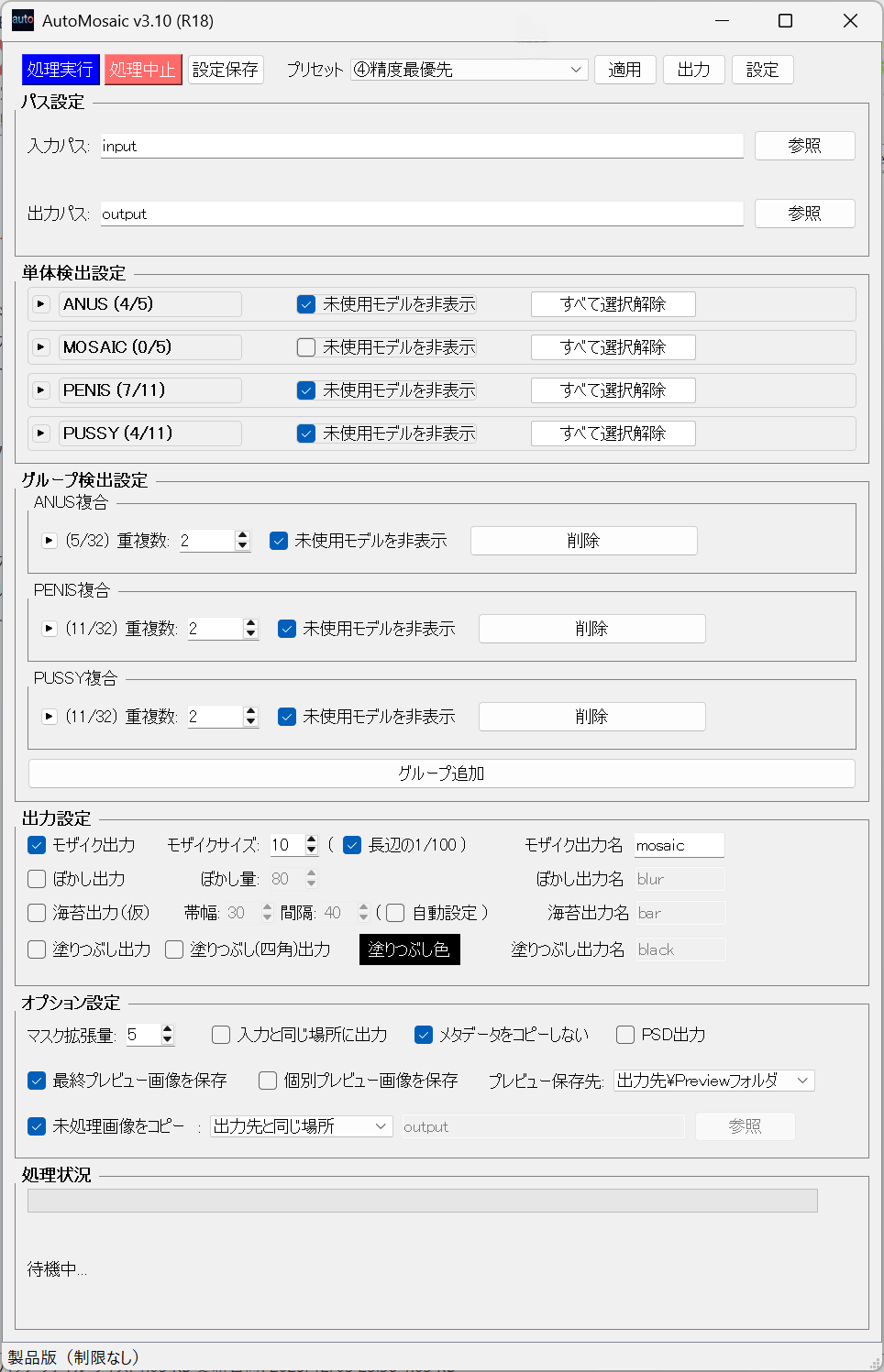
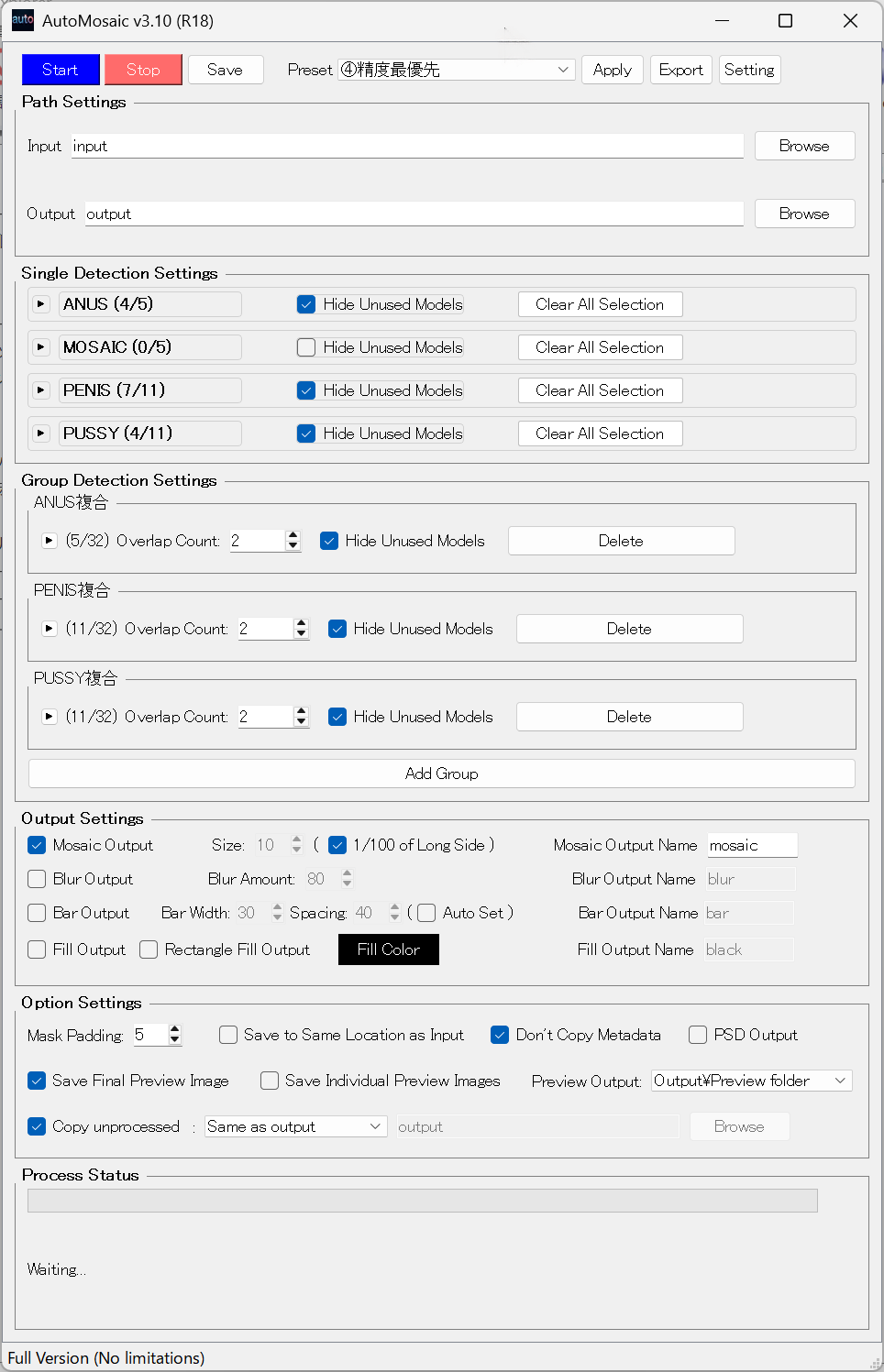
Video demo紹介動画
1-minute overview covering the interface and basic operations (steps 1-4). 1分で概要と基本操作(ステップ1-4)を説明します


Trial Version体験版
Windows (No GPU / GPU: RTX 50XX series or earlier)
Windows (GPUなし / GPU: RTX 50XXシリーズ以前)
Windows (GPU: RTX 50XX series or later)
Windows (GPU: RTX 50XXシリーズ以降)
What's included
体験版の内容
- ✓ All features available
- ✓ Process up to 5 images per batch
- ✗ Watermark added to processed images
- ✓ 全機能を試せます
- ✓ 連続5枚まで処理可能
- ✗ 体験版処理画像には透かし追加
Updates & Changelog更新情報・変更履歴
Latest Updates
最新の更新内容
- Performance improvements
- Bug fixes
- User feature requests
- 処理速度改善
- バグ修正
- 要望対応
License & Usage Notes ライセンス・ご利用上の注意
License
ライセンス
- Personal use (including commercial): Included with purchase
- Corporate/enterprise use: Please contact separately for licensing
- 個人での商用利用: 本製品の購入で利用可能
- 企業での商用利用: 別途ご相談ください
Important Notes
重要な注意事項
- Processing may take time depending on your PC/GPU specifications
- Please review all outputs after processing to ensure accuracy
- Detection accuracy may vary depending on image quality and conditions
- 処理にはお使いのPC/GPUの性能に応じて時間がかかる場合があります
- 処理結果は必ずご確認ください
- 検出精度は画像の品質や条件により変動する場合があります