Meta Converter
Convert images to PNG/JPEG/WEBP while preserving metadata. Perfect for AI-generated images with support for WebUI, ComfyUI, NovelAI, and Eagle software.
Meta Converter
メタデータを保持したまま、複数画像をPNG/JPEG/WEBPに変換できるツールです。WebUIのPNGinfoに取り込みが可能な状態で変換・圧縮でき、Eagleソフトウェアにも対応しています。
Overview 概要
Meta Converter is specifically designed for AI-generated images, allowing you to convert and compress images while maintaining all generation metadata. The converted images can be directly imported into WebUI's PNGinfo, and it also supports Eagle software library conversion.
主にAI画像の変換を想定し、メタデータを維持したまま画像の変換・圧縮が可能です。変換した画像はWebUIに取り込み可能で、Eagle(https://jp.eagle.cool)のライブラリの変換にも対応しています。
- Batch conversion: Convert multiple images while preserving metadata
- Format support: PNG/WEBP → JPEG/PNG/WEBP conversion
- File size reduction: PNG → JPEG reduces file size to 1/10 with significant compression
- WebUI compatible: Direct import to WebUI after conversion
- Quality adjustment: Fine-tune quality and image resizing options
- Eagle support: Eagle library conversion support
- CLI support: Command-line interface support
- 一括変換: メタデータを維持したまま、複数画像の変換(PNG/WEBP→JPEG/PNG/WEBP)
- 大幅圧縮: PNG→JPEGはサイズ1/10と画像データの大幅なサイズ削減が可能
- WebUI対応: 変換した画像はWebUIに取り込み可能
- 品質調整: 品質の調整や画像サイズの縮小等の微修正も可能
- Eagle対応: Eagle(https://jp.eagle.cool)のライブラリの変換に対応
- CLI対応: コマンドラインでの起動にも対応
Supported AI Formats 対応AIデータ
A1111 WebUI
A1111 WebUI
PNGinfo readable after conversion
変換後もPNGInfo読み込み可
ComfyUI
ComfyUI
For JPG conversion, workflow is output as a separate JSON file
JPGへの変換ではワークフローはjsonファイルとして別出力
NovelAI
NovelAI
For JPG/WEBP conversion, metadata is preserved in a separate mini-file
JPG,WEBPへの変換ではメタデータ保持用のミニファイルを別出力
How to use 基本的な使い方
- Select a folder containing images or drag and drop image files/folders
- Adjust conversion format, quality settings, etc.
- Click "Start Conversion" button
- 画像の入ったフォルダを選択 or 画像ファイルやフォルダをドラッグアンドドロップ
- 変換形式/変換品質などを変更
- 「変換開始」ボタンをクリック
System requirements動作環境
- OS: Windows 10/11 (64-bit)OS: Windows 10/11 64bit
- Memory: 8 GB or more recommendedメモリ: 8GB 以上推奨
- Storage: 30MB+ free space requireストレージ: 30MB以上の空き容量
No GPU required. Runs on CPU for universal compatibility.
GPU不要。CPUで動作し、幅広い環境で使用可能です。
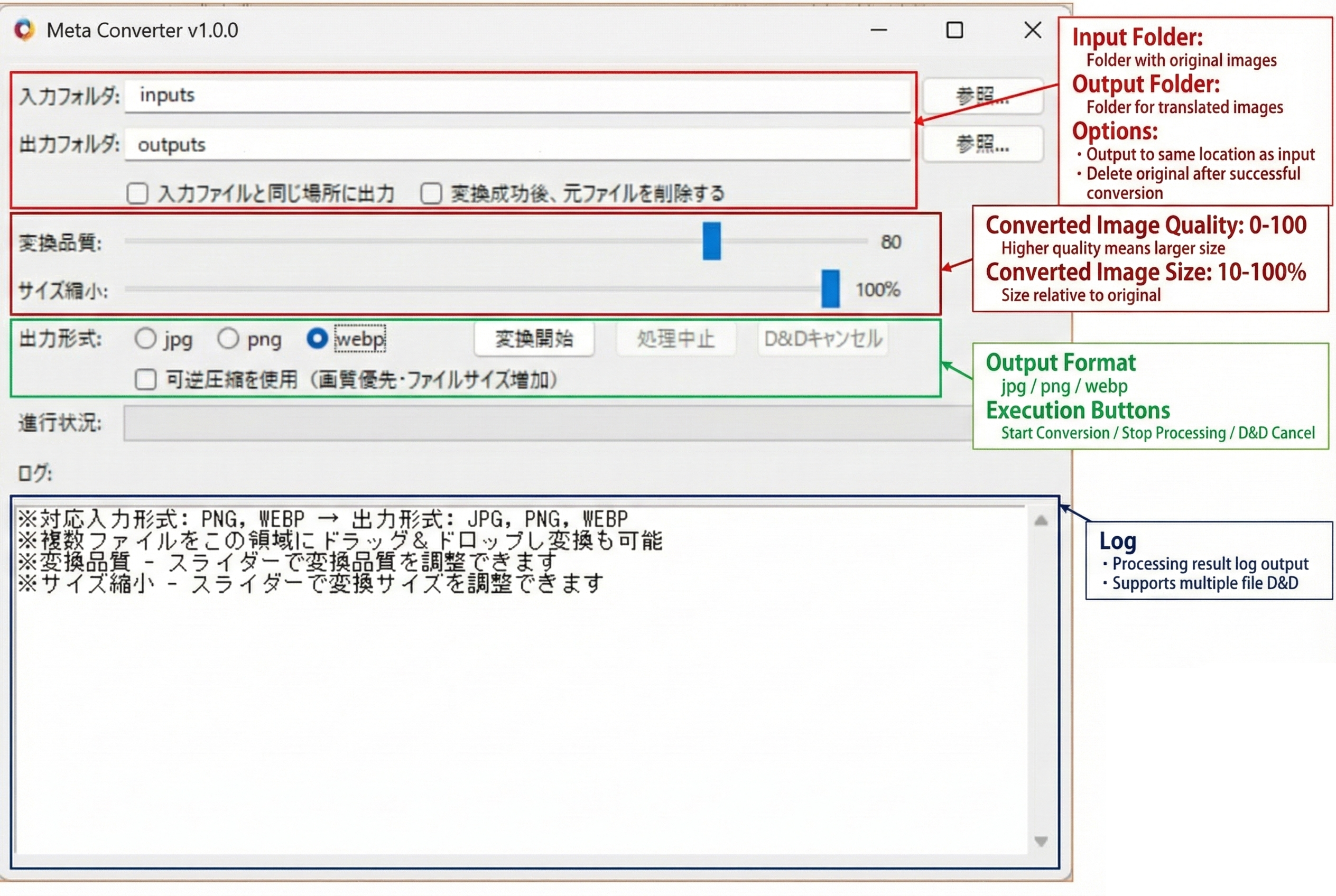
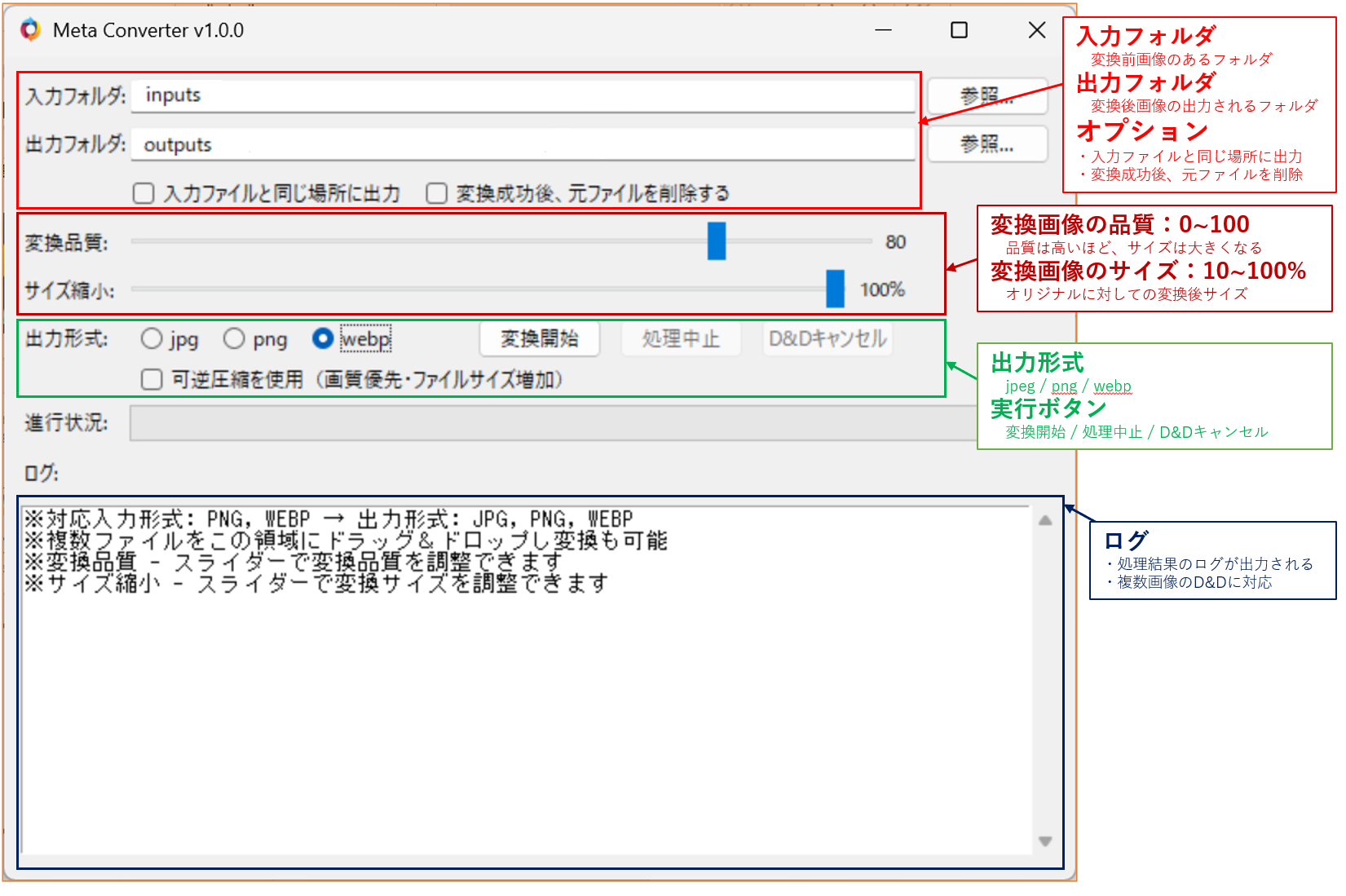
UI screenshotUIスクリーンショット
Trial Version体験版
Trial Version Limitations
体験版の制限事項
- Maximum 8 images per batch
- 1回の処理可能枚数: 8枚まで
Updates & Changelog更新情報・変更履歴
Latest Updates
最新の更新内容
- NovelAI support
- NovelAI対応
License & Usage Notes ライセンス・ご利用上の注意
License
ライセンス
- Personal use (including commercial): Included with purchase
- Corporate/enterprise use: Please contact separately for licensing
- 個人での商用利用: 本製品の購入で問題ありません
- 企業での商用利用: 別途ご相談ください
Important Notes
注意事項
- Processing may take time
- Trial version has limitations
- Please verify all processing results
- 処理には時間がかかる場合があります
- 体験版には制限事項があります
- 処理結果は必ずご確認ください