
Meta Converter
Convert images to PNG/JPEG/WEBP while preserving metadata. Perfect for AI-generated images with support for WebUI, ComfyUI, NovelAI, and Eagle software.
Card / PayPal
Overview
Meta Converter is specifically designed for AI-generated images, allowing you to convert and compress images while maintaining all generation metadata. The converted images can be directly imported into WebUI's PNGinfo, and it also supports Eagle software library conversion.
- Batch conversion: Convert multiple images while preserving metadata
- Format support: PNG/WEBP → JPEG/PNG/WEBP conversion
- File size reduction: PNG → JPEG reduces file size to 1/10 with significant compression
- WebUI compatible: Direct import to WebUI after conversion
- Quality adjustment: Fine-tune quality and image resizing options
- Eagle support: Eagle library conversion support
- CLI support: Run from the command line in addition to the GUI
- In-app updates: Get notified of new versions and update from within the app
Supported AI Formats
A1111 WebUI
Convertible while preserving metadata in all formats
ComfyUI
PNG/WebP can be converted while preserving metadata.
When converting to JPG, the workflow is output separately as a JSON file.
NovelAI
PNG/WebP can be converted while preserving metadata.
When converting to JPG, a small companion file for metadata preservation is output separately.
How to use
- Select a folder containing images or drag and drop image files/folders
- Adjust conversion format, quality settings, etc.
- Click "Start Conversion" button
System Requirements
- OS: Windows 10/11 (64-bit)
- Memory: 8 GB or more recommended
- Application size: 50MB or less
No GPU required. Runs on CPU for universal compatibility.
UI screenshot
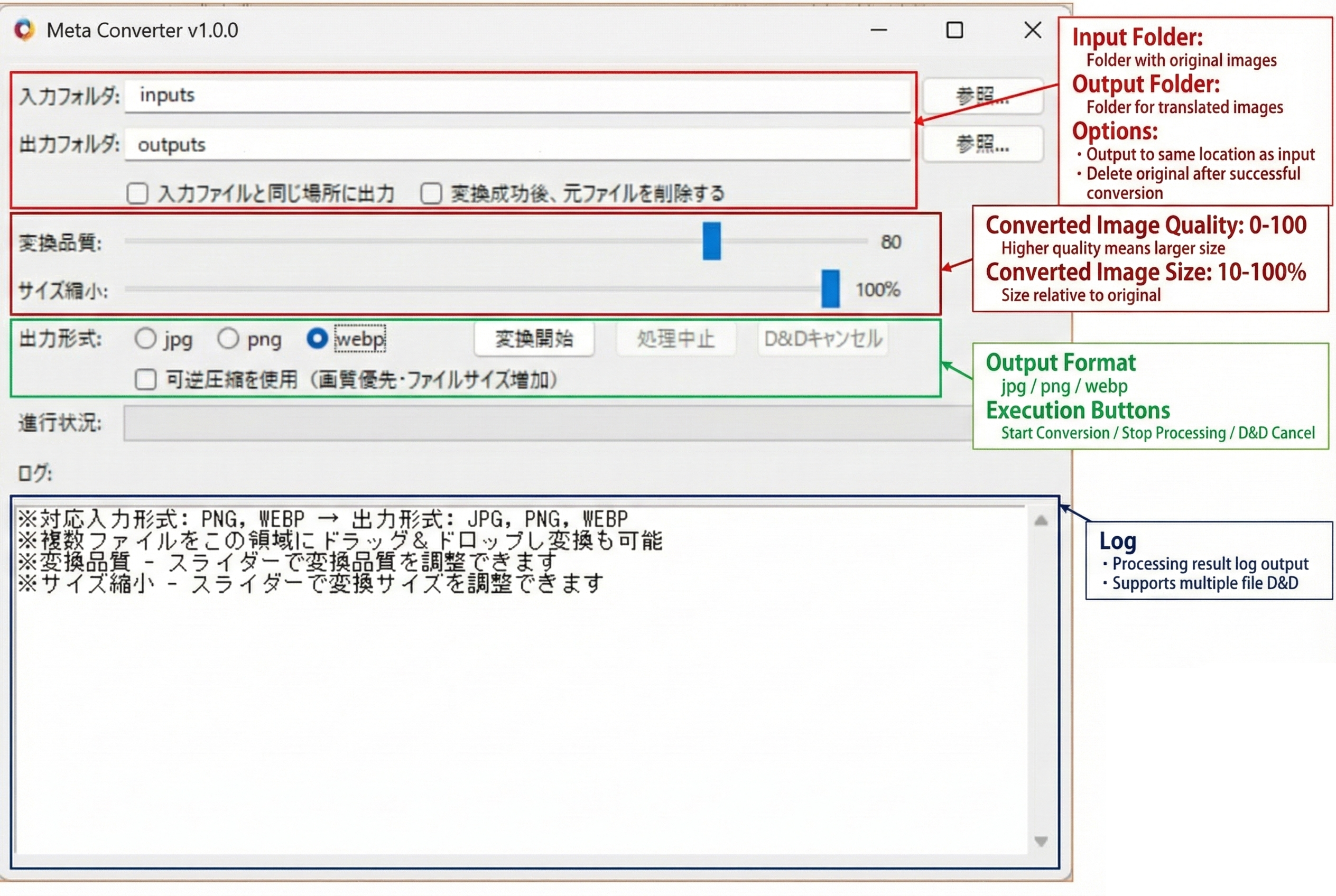
Trial Version
Trial Limitations
- Maximum 8 images per batch
License & Usage Notes
License
- Personal use (including commercial): Included with purchase
- Corporate/enterprise use: Contact us by email
Important Notes
- Processing may take time
- Trial version has limitations
- Please verify all processing results
Updates
Latest Updates
- User-requested improvements and bug fixes