
Frame Craft
Extract video frames and convert to animations (GIF/WEBP) with high precision. Perfect for screenshot extraction, animation creation, and Pixiv ugoku-illust workflows.
Frame Craft
動画から高精度でフレーム抽出やGIF/WEBPアニメ変換が行えるツールです。スクショ取り、アニメ作成、Pixivうごイラストワークフローに最適です。
Overview 概要
Frame Craft is a powerful tool for extracting frames from videos and animation files at specified intervals, or converting them to animation formats (GIF/WEBP). It's designed for content creators who need precise frame extraction, duplicate image removal, and animation creation workflows.
Frame Craftは、動画やアニメーションファイルから指定したフレームや秒間隔で画像を抽出したり、アニメーション形式(GIF/WEBP)に変換が行えるツールです。正確なフレーム抽出、重複画像削除、アニメーション作成ワークフローを必要とするコンテンツクリエイター向けに設計されています。
- High-precision extraction with frame/second-based settings
- Duplicate removal using perceptual hash technology
- Batch processing via drag & drop
- 14 video formats including MP4, AVI, MOV, GIF, WebP
- Animation output: GIF/WEBP + Pixiv ugoku-illust mode
- 高精度抽出 - フレーム間隔や秒数間隔での正確な指定
- 重複削除 - パーセプチュアルハッシュ技術による類似画像検出
- バッチ処理 - ドラッグ&ドロップで一括処理
- 14種類の動画形式 - MP4、AVI、MOV、GIF、WebPなど
- アニメ出力 - GIF/WEBP、Pixivうごイラストモード対応
Supported Formats 対応形式
Input formats
入力形式
- MP4, AVI, MOV
- MKV, WMV, FLV
- WebM, MPEG, MPG
- M4V, TS, OGV
- GIF, WebP (animation)
- MP4, AVI, MOV
- MKV, WMV, FLV
- WebM, MPEG, MPG
- M4V, TS, OGV
- GIF, WebP(アニメ)
Outputs
出力
- Images: JPG, PNG
- Animations: GIF, WEBP
- Pixiv ugoku-illust format
- Last frame extraction
- 画像: JPG、PNG
- アニメ: GIF、WEBP
- Pixivうごイラスト形式
- 最終フレーム抽出
Key Features基本機能
■ High-precision Frame Extraction
■ 高精度画像抽出
- Precise frame interval or second-based extraction
- Automatic FPS detection for optimal extraction
- Pixiv ugoku-illust output mode
- Video to animation format conversion (GIF/WEBP)
- 正確なフレーム間隔や秒数間隔での指定が可能
- 自動FPS検出機能で、動画に応じた最適な抽出を実現
- Pixivうごイラスト用の出力モードを搭載
- 動画をアニメーション形式(GIF/WEBP)にも変換可能
■ Automatic Duplicate Removal
■ 重複画像自動削除
- High-precision similar image detection using perceptual hash technology
- Memory-efficient processing for large image batches
- Removes duplicate and nearly identical frames automatically
- パーセプチュアルハッシュ技術による高精度な類似画像検出
- メモリ効率的な処理で大量の画像にも対応
- 重複フレームやほぼ同一のフレームを自動的に削除
■ Batch Processing & Efficiency
■ バッチ処理と効率化
- Drag & drop multiple videos for batch processing
- Real-time progress display and detailed log output
- Monitor processing status at a glance
- 複数動画をドラッグ&ドロップで一括処理
- リアルタイム進捗表示と詳細ログ出力で作業状況を把握
- 処理状況を一目で監視
■ Additional Convenient Features
■ 便利な追加機能
- Automatic black bar removal (auto-crop borders)
- Intuitive GUI design for easy operation
- Last frame extraction for video concatenation workflows
- 黒帯自動削除機能で、動画の上下左右の黒帯を自動トリミング
- 直観的なGUIで初心者にも使いやすい設計
- 動画生成の連結始点用の最終フレーム出力
How to use & UI screenshot基本的な使い方 & UIスクリーンショット
How to use
基本的な使い方
- Click the "Add Video" button or drag & drop video files
- Click the "Start Extraction" button to begin processing
- 「動画を追加」ボタンをクリックまたは動画ファイルをドラッグ&ドロップ
- 「抽出を開始」ボタンで処理開始
Simple two-step process makes it easy to extract frames from your videos and convert them to animations.
シンプルな2ステップで動画からフレーム抽出やアニメーション変換が簡単に行えます。
UI screenshot
UIスクリーンショット
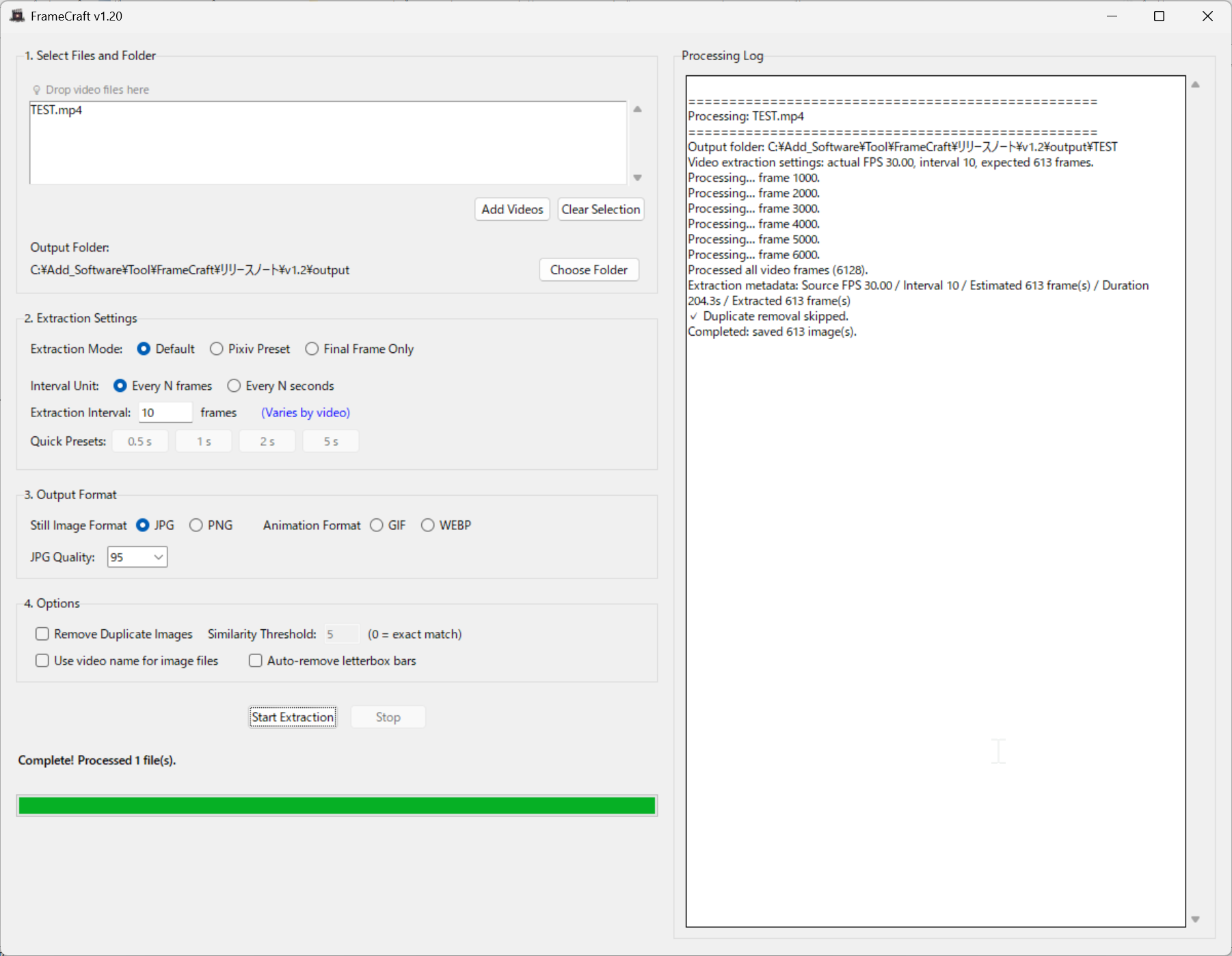
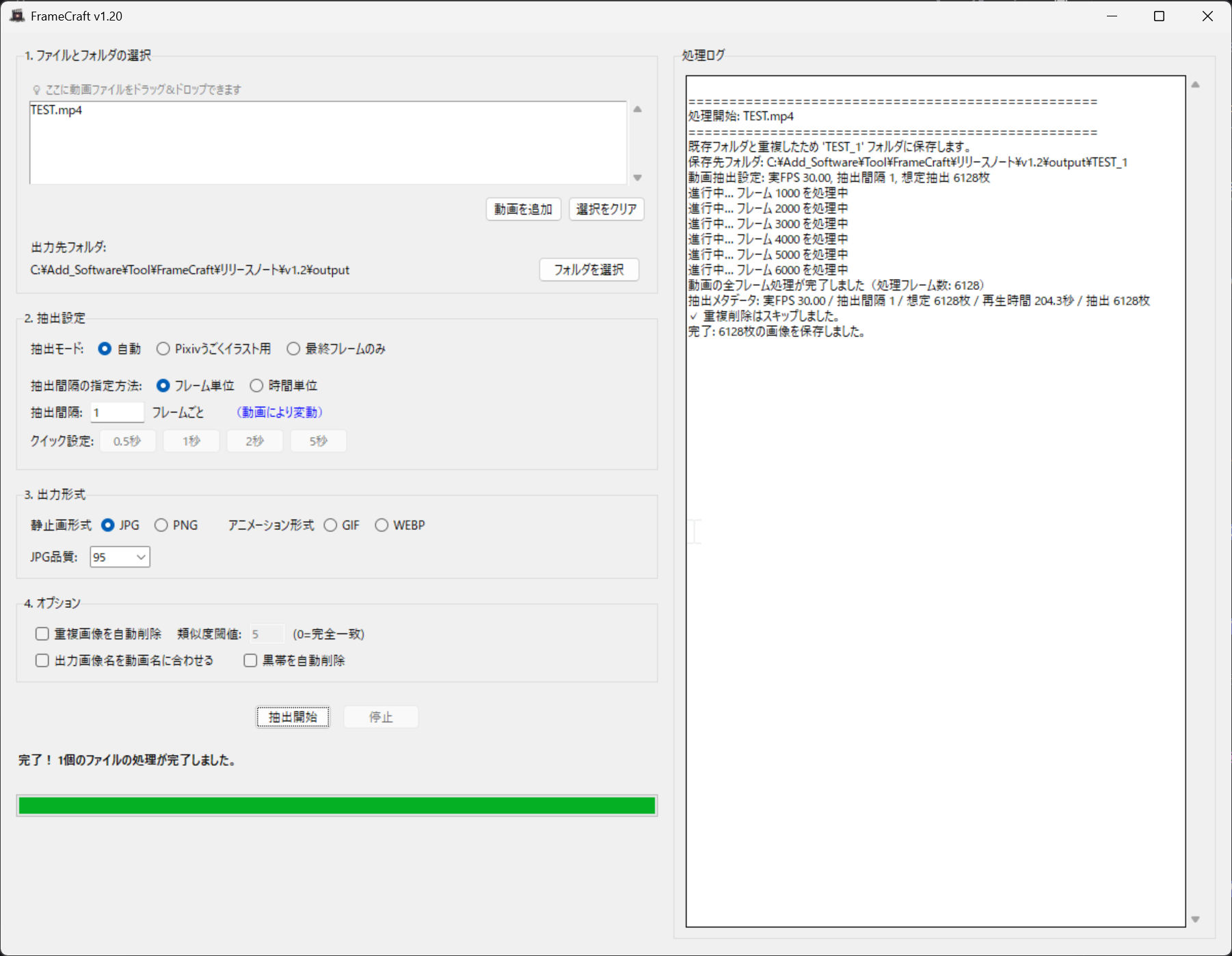
System requirements動作環境
- OS: Windows 10/11 (64 bit)
- Memory: 4GB+ recommended
- Storage: 100MB+ free space required
- OS: Windows 10 / Windows 11(64bit)
- RAM: 4GB以上推奨
- ストレージ: 100MB以上の空き容量
No GPU required. Runs on CPU for universal compatibility.
GPU不要。CPUで動作し、幅広い環境で使用可能です。
Trial Version体験版
Windows 10/11
Windows 10/11
Trial limitations
体験版の制限事項
- Maximum 400 images/frames per video
- Process 1 video at a time
- Watermark added to output
- 1動画あたり最大400画像/フレームまで
- 同時処理1動画まで
- 透かし付き出力
Updates & Changelog更新情報・変更履歴
Latest Updates
最新の更新内容
- Added GIF/WEBP output support
- Enhanced frame extraction precision
- Improved duplicate detection algorithm
- GIF/WEBP出力追加
- フレーム抽出精度の向上
- 重複検出アルゴリズムの改善
License & Usage Notes ライセンス・ご利用上の注意
License
ライセンス
- Personal use (including commercial): Included with purchase
- Corporate/enterprise use: Please contact separately for licensing
- 個人での商用利用: 本製品の購入で利用可能
- 企業での商用利用: 別途ご相談ください
Important Notes
重要な注意事項
- Processing time may vary depending on video length and PC specifications
- Always verify output results for accuracy
- Frame extraction accuracy may depend on video quality and encoding
- 処理時間は動画の長さやPCの性能により変動します
- 処理結果は必ずご確認ください
- フレーム抽出精度は動画の品質やエンコードにより変動する場合があります